Spiro 2.33: Smart Data Bridge — AI-powered data import
Migrating to a new ERP/CRM system, or updating massive product catalogs on a regular basis, always comes with a familiar headache: manual spreadsheet wrangling, endless field mapping, and the risk of human error. Spiro 2.33 solves all of this at once.
Why is data migration always a challenge?
Switching to a new system always means dealing with data the company has built up over the years: a catalog of products and services, a customer base, records from a previous CRM. Migrating this volume manually means weeks of sorting through records, untangling mismatched structures, and a high likelihood of errors. With Spiro 2.33, AI now handles this work in just a few steps.
The solution: Smart Data Bridge
Smart Data Bridge is a new AI-powered feature in Spiro that automates data migration into the system. AI analyzes the structure of your data and maps it to Spiro's properties, significantly cutting migration time and cost compared to a manual approach.
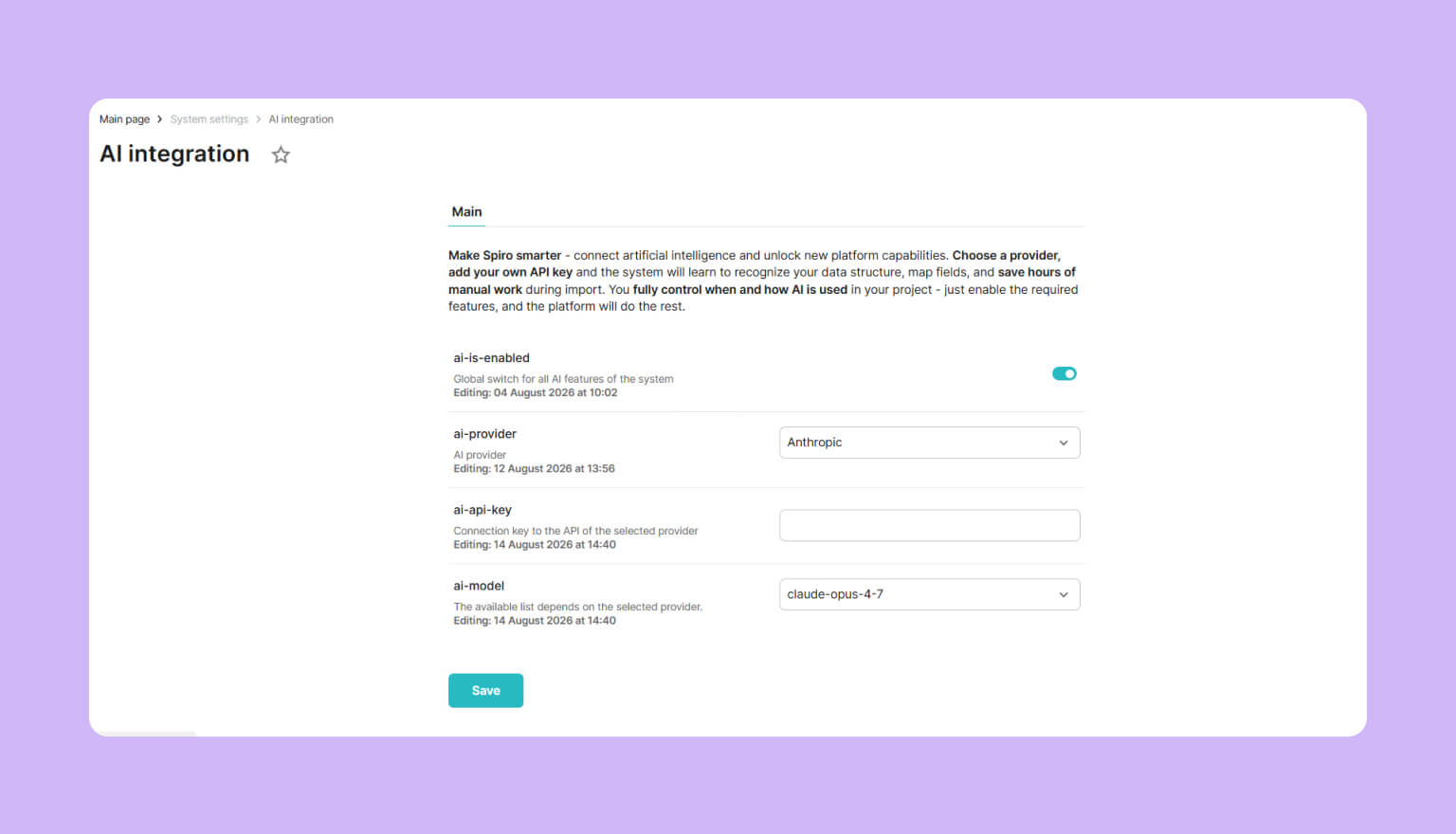
You can turn AI usage on or off platform-wide, choose a provider (Anthropic or OpenAI out of the box), and select a model from the currently available list. You can also connect your own API key and run everything on your own AI provider account.
These flexible settings let you factor in your business requirements, internal infrastructure, or security policy, and switch to new AI models as soon as they become available in the system.
How does Smart Data Bridge work?
AI analyzes the structure of your files and works out how it fits into the system. The process is fully transparent and stays under your control:
-
Upload: select an entity, then upload a file in CSV or XLSX format.
-
AI analysis: the system reads the column names and understands what data each one holds.
-
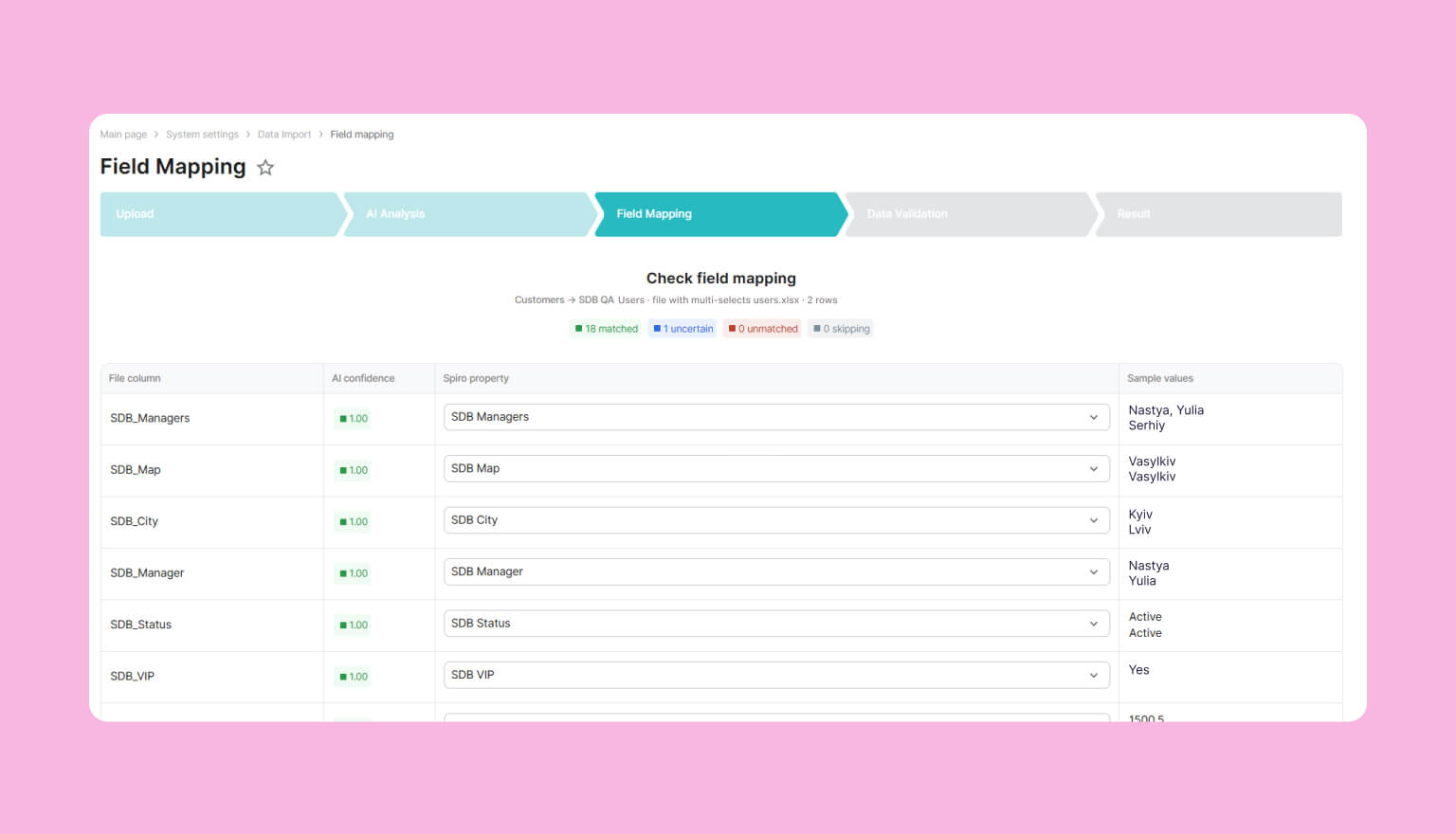
Smart mapping: AI proposes a match between file fields and Spiro properties, along with a confidence score for each one.
-
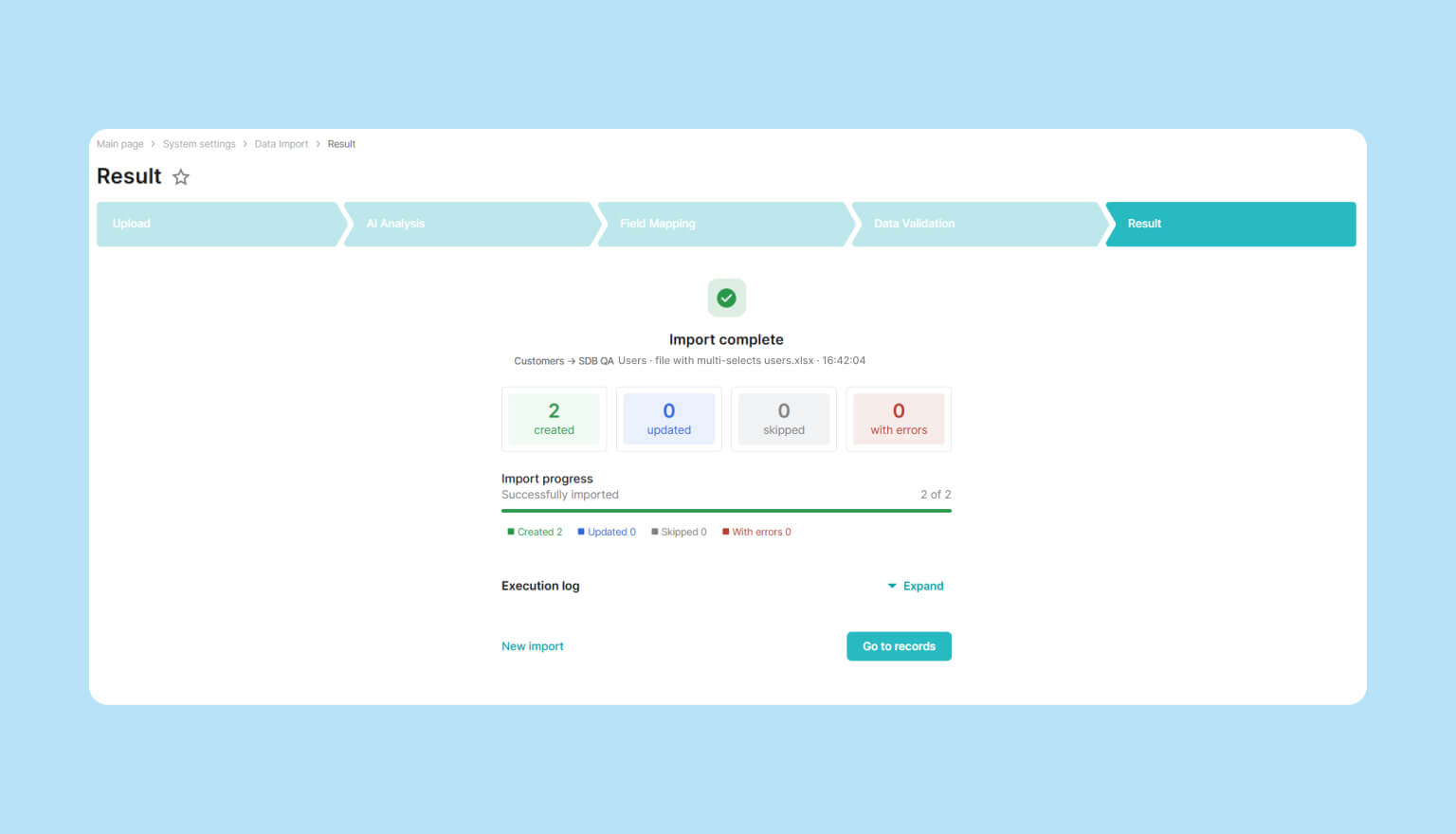
Quality check: before the final import, records are sorted into categories (successful, uncertain, duplicates, conflicts, or blocked). The final call on any disputed records is always yours.
-
Result: a clear report on records created, updated, or skipped, with reasons for each outcome.
Protection against human error
Manually copying thousands of rows from a supplier's price list or a legacy database almost always introduces errors: swapped columns, overwritten prices, incorrect names, or broken field formats. Smart Data Bridge analyzes the entire file structure at once, rather than transferring records row by row, removing the human factor from the exact stage where it causes the most errors.
Human-in-the-Loop and data security
We know how important business data security is, which is why we built several key principles into the architecture of this solution:
Security first: AI never has direct access to your database. It works only with reference data needed for mapping, while the actual import is handled by Spiro.
Full control: AI takes care of the routine work, but the final decision always rests with you. You can see the system's confidence level for each field and easily adjust the mapping manually.
Flexibility: you can use the platform's built-in models or connect your own AI provider API key, adapting the system to your company's security policy.
Use cases for Smart Data Bridge
One common use case is the initial data transfer when switching to Spiro: this might be an export from a previous CRM, a catalog of products and services, a customer database, or a supplier list. This is the stage where the volume of data to migrate is largest, so the time and resource savings from automating the process are most noticeable. Spreadsheet consolidation is often handled by sales managers, procurement specialists, or even developers, and Smart Data Bridge frees up their time for work that actually needs their expertise.
But that's not the only use case. This functionality also fits into regular business processes after the switch to Spiro. A few examples:
-
Updating product or service catalogs. When your assortment changes often, with new items added or prices and specs updated, a new price list from a supplier or manufacturer can be uploaded in whatever format it arrives in, with no manual re-entry required.
-
Working with supplier or partner data. Different suppliers send data in their own format: the same field might be labeled "Article," "SKU," or "Product code." Previously, each major partner required its own custom script or manual corrections. With Smart Data Bridge, that's no longer necessary: the feature recognizes and unifies records from different sources on its own.
-
Importing leads or inquiries. Leads from trade shows, landing pages, or marketing campaigns are often collected in spreadsheets before they reach the system. The same flow lets you bring them into Spiro without setting up anything separately for each source.
With Smart Data Bridge, data import stops being a labor-intensive task, since the AI feature becomes part of the everyday workflow, regardless of the use case or the specifics of your business data.
If you'd like to see how Smart Data Bridge can simplify data import for your business, get in touch through this form. Our technical expert will walk you through the new Spiro functionality, tailored to your needs.