en
  • EN
  • UA

Which of these situations sounds like you?

icon

First impression

The product is technically ready, but looks unpolished, and this affects the first impression for clients and investors
icon

Inconsistent design

Because the website, app, and logo were created by different contractors, they don't form a cohesive brand image
icon

Presentability

You're preparing for the first public showcase to investors or clients, but the product doesn't visually match that level of presentation
icon

Early stage

At the start of MVP development, it becomes clear: without a defined visual language, everything will need to be redone from scratch after launch
icon

No guidelines

Without standards in place, developers have to clarify and independently decide on every choice around colors, buttons, and fonts
icon

No brand book

A freelancer created the logo with no follow-up support. Now you're not sure how to use it correctly or what to hand off to development

Digital Identity is a cohesive visual foundation for your product

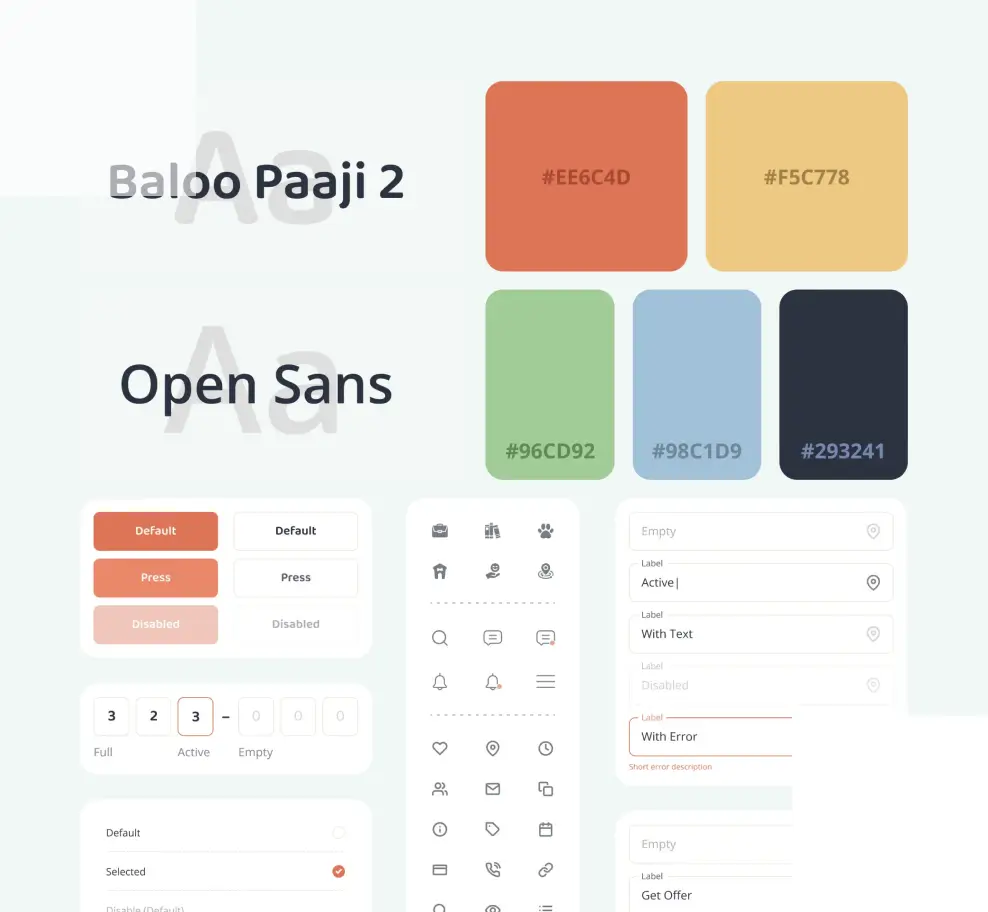
Digital identity is a set of digital assets needed to make a product look cohesive and recognizable everywhere: in the app, on the website, in the App Store and Google Play, on social media, or in presentations. It includes a logo, a color system in CSS variables, typography, brand guidelines, and a UI Kit.

Where Digital Identity fits in our product delivery process:

Discovery → Digital Identity → Product UI/UX Design → Development

As your technical partner with design expertise, we turn the results of the Discovery phase into a visual system that reflects the product's positioning, audience, and business goals. It becomes the foundation for further design decisions and is handed off to the UI/UX team.

What's included in Digital Identity?

Step 1

Identity Kickoff: context and direction

Filling out the brief: product audience, competitors, brand character.

Putting together a moodboard: three visual style directions to choose from.

Conducting a reference audit: analyzing how leaders in the niche look, to understand the audience's visual expectations and build a recognizable, distinctive design.


Step 2

Logo and mark

3 concepts → final version

Developing three concepts with different styles and character, each presented as a mark, a logo, and a combined version. We run one structured round of feedback, select a concept, and refine it into the final version.

Ready files: SVG, PNG with a transparent background, dark and light versions, a monochrome variant, a minimal version for favicon.

Step 3

Color system for UI

Primary colors (2–3), neutral colors (grays, white, black), semantic colors (success, warning, error, info). Contrast checked against WCAG AA: accessibility is mandatory, not optional. Dark and light mode, if the product calls for both. HEX + RGB + HSL + CSS variables, ready to hand off to developers.

Step 4

Typography for a digital product

Selecting 1–2 fonts: a display font for headings and a text font for body copy. Priority goes to Google Fonts or variable fonts for fast loading.

Building a typography scale with specific sizes and spacing: H1–H6, body, caption, label, code. Checking readability on mobile and desktop screens. CSS styles ready to be added to the codebase.

Step 5

UI Kit: core components in Figma

An atomic library ready to hand off to development: buttons (primary, secondary, ghost, danger), inputs and forms, checkboxes, radio buttons, toggles, badges and tags, avatars, icon wrappers, spinners and loaders. Each component covers all states (default, hover, focus, disabled, error). Auto layout and Variables in Figma ensure proper component architecture.

Step 6

Digital assets for launch

App icon in all sizes required for iOS and Android. Favicon and OG image for the website. Branded cover templates for LinkedIn, X, or other social media. Splash screen for the mobile app. Presentation template in Figma or Google Slides for pitch decks and partner meetings.

Step 7

Mini Digital Brand Guide in Figma

A compact, practical document: how to use the logo (sizes, spacing, prohibited variations), color codes in all formats, typography scale, guidelines for developers. 15–20 pages in Figma.

Optional

Marketing site or landing page

Based on the finished Digital Identity, we design a landing page or marketing site. Structure: Hero → Value Props → How it works → Social Proof → CTA. Responsive design for web and mobile. Handed off to development (FreshTech's team or yours) or can be built on Webflow or Framer.

What results will you get from Digital Identity?

Figma file
with the system

Logo, UI Kit, and Brand Guide in one organized file with the right architecture. Editing access stays with you. We also run a 30-minute online session explaining the structure and principles of use.

UI Component
Library

Core Figma components, ready to hand off to code. They're used at the Product UI/UX Design stage and form the foundation of the product's entire design system.

Mini Brand
Guide

A compact Figma document for the team and contractors: logo usage rules, colors, fonts, guidelines for developers.

Asset
Pack

All logo files in SVG/PNG formats, app icons, favicon, OG image, social media templates, organized into structured folders on Google Drive. Ready for publication in the App Store, Google Play, and on the website right after handoff.

Design
Tokens

CSS variables for colors and typography: just connect them to get correct styles. Consistency is maintained without daily check-ins with the designer, and the system scales without manual updates when new features are added.

Landing Page Design
(optional)

Design for a marketing site or landing page, ready for development or publication on Webflow or Framer, built on the newly formed Digital Identity.

Choose the format that fits your needs

Package 1

Identity Essentials

$3,000–4,500
2–2.5 weeks

The minimum set needed to start development and launch publicly. Suited to startups and new products preparing for a public launch.

  • Logo (3 concepts → 1 final) in all digital formats
  • Color system + CSS variables
  • Typography + UI scale
  • App icon + favicon
  • Mini Digital Brand Guide in Figma
Package 2

Identity Standard

$5,500–7,500
3–3.5 weeks

For startups moving straight into product development: a UI Kit ready to use in code. Suited if development starts alongside Digital Identity or right after it. UI Kit and Design Tokens keep design and code aligned.

  • Everything in the Identity Essentials package
  • UI Kit: core components in Figma (buttons, forms, states)
  • Design Tokens for developers
  • Social media templates
  • OG image for the website and sharing
Package 3

Identity Full

$8,000–10,000
4–5 weeks

A complete set of digital assets for a public launch or fundraising. Suited to startups ahead of their first public showcase to investors or clients.

  • Everything in the Identity Standard package
  • Landing page or marketing site design (web and mobile)
  • Pitch deck template in Figma or Google Slides
  • Splash screen for the mobile app

Why FreshTech?

Freelancer
FreshTech
Brand agency
Timeline and cost
Depend on the specific specialist
Fixed timeline and cost
2–4 months of work and a budget of $15,000–30,000
Scope of work
Logo with no usage strategy or system
Only the components needed to launch the product
Scope goes beyond what a startup needs at launch
Technical integration
Design may need rework before development
UI Kit and Design Tokens ready to hand off to development
Design and technical implementation need syncing
Documentation
Documentation is limited or absent
Mini Brand Guide in a format the team can use
An extensive guideline built for a mature business
Approvals and feedback
Feedback cycles and timelines set on a case by case basis
Every stage comes with a clear feedback cycle
Long approval cycles with no clear structure

What does this look like in practice?

case №1

Fintech startup

Identity Standard + MVP 3 weeks

Request: identity for a fintech startup as part of the Fintech Starter Kit, replacing a placeholder logo with no color system or UI Kit.

Result: Identity Kickoff running alongside development. Three logo concepts with a final version, a color system with dark mode, a UI Kit for developers, an App Store icon, an OG image, and a pitch deck template for the first round of negotiations.

case №2

B2B SaaS

Identity Essentials 2 weeks

Request: a separate digital identity for the company's new SaaS product, aligned with the company's corporate brand.

Result: Identity Essentials built around the corporate guidelines. A logo that connects with the main brand while also working on its own, a color system for a dark UI, typography, app icon, Mini Brand Guide.

case №3

Startup project

Identity Full 4 weeks

Request: a full redesign of the startup's visual identity ahead of a public launch and first round of fundraising.

Result: Identity Full: a new logo, a color system with light and dark modes, a UI Kit, an updated App Store listing with new screenshots, a landing page design for the launch campaign, and a pitch deck template for investor negotiations.

Frequently Asked Questions

How is Digital Identity different from branding?
Branding covers positioning strategy, naming, tone of voice, offline materials, and sub brand architecture. Product branding isn't our specialty. We create Digital Identity: a specific set of digital assets for going to market, including a logo, color system, typography, and UI Kit. The focus is exclusively on the digital environment.
We already have a logo. Do we need a digital identity?
Can we order just the UI Kit or just the logo?
Can development start alongside Digital Identity?
What's included in the optional landing page?

Ready to create a unique digital identity?

Fill out the form and we'll get in touch within 24 hours for a short call and provide a preliminary estimate of cost and timeline.
contact-image
Serhii Kutyr, CEO

[email protected]

We value your privacy
To provide our visitors with the best user experience, our site uses cookies. By continuing to browse our site, you confirm that you agree to our Privacy Policy